What is VectorFaces?
Since today is December 24th, how about some BBQ for Christmas Dinner?
VectorFaces is a face recognition demo I developed to showcase Elasticsearch vector capabilities at conferences. It searches through 1.2 million celebrity face embeddings using Elasticsearch BBQ, DIskBBQ, int8 and int4 quantization techniques.
Click here to try the live demo with start-local on a single CPU (!), or run it yourself by checking out the github repo.
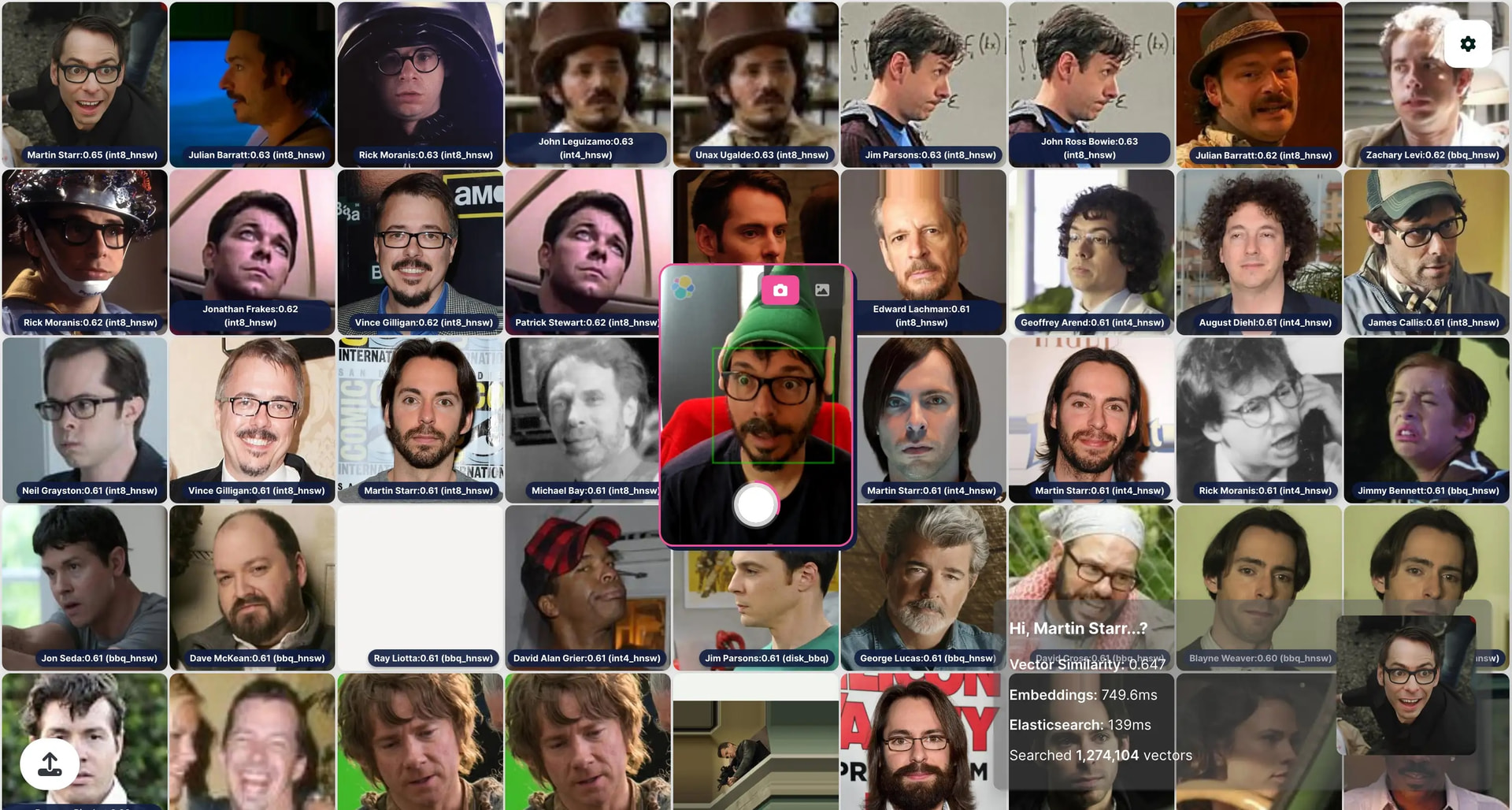
The dataset is an excerpt from the IMDB-WIKI dataset, which contains celebrity images from IMDb and Wikipedia. We generated 512-dimensional embeddings using InsightFace.
The demo leverages four quantization methods in parallel in four different indices with 318,526 vector embeddings each (totaling 1.2 million vectors), letting you compare their performance directly:
- BBQ (Better Binary Quantization) - Elasticsearch's binary quantization combining high recall with significant compression
- DiskBBQ - BBQ optimized for disk storage, reading vectors directly from disk during rescoring
- int8 - 8-bit integer quantization reducing each dimension from 4 bytes to 1 byte
- int4 - 4-bit quantization providing maximum compression (8× smaller than float32)
All quantization introduces some accuracy loss. In practice, int8 typically needs little to no rescoring, int4 often benefits from 1.5×–2× oversampling, and BBQ commonly requires 3×–5× oversampling for optimal recall. Each method balances accuracy, speed, memory footprint, and storage differently, you can play with the parameters and change the oversampling to verify that.
In Settings, you can experiment with these parameters to balance speed and accuracy, and select which indices will be considered on the query:
size: Number of results that we bring back from Elasticsearch. Must be ≤ k. k: Number of nearest neighbors to return globally across all shards. The final top k results are merged from all shards. num_candidates: Number of approximate neighbors to gather per shard before selecting the top k. Higher values improve recall and accuracy but increase latency. This is the primary knob for optimizing the latency/recall trade-off. For quantized indices, increasing num_candidates effectively oversamples the search space, which helps recover accuracy lost during quantization. |
|
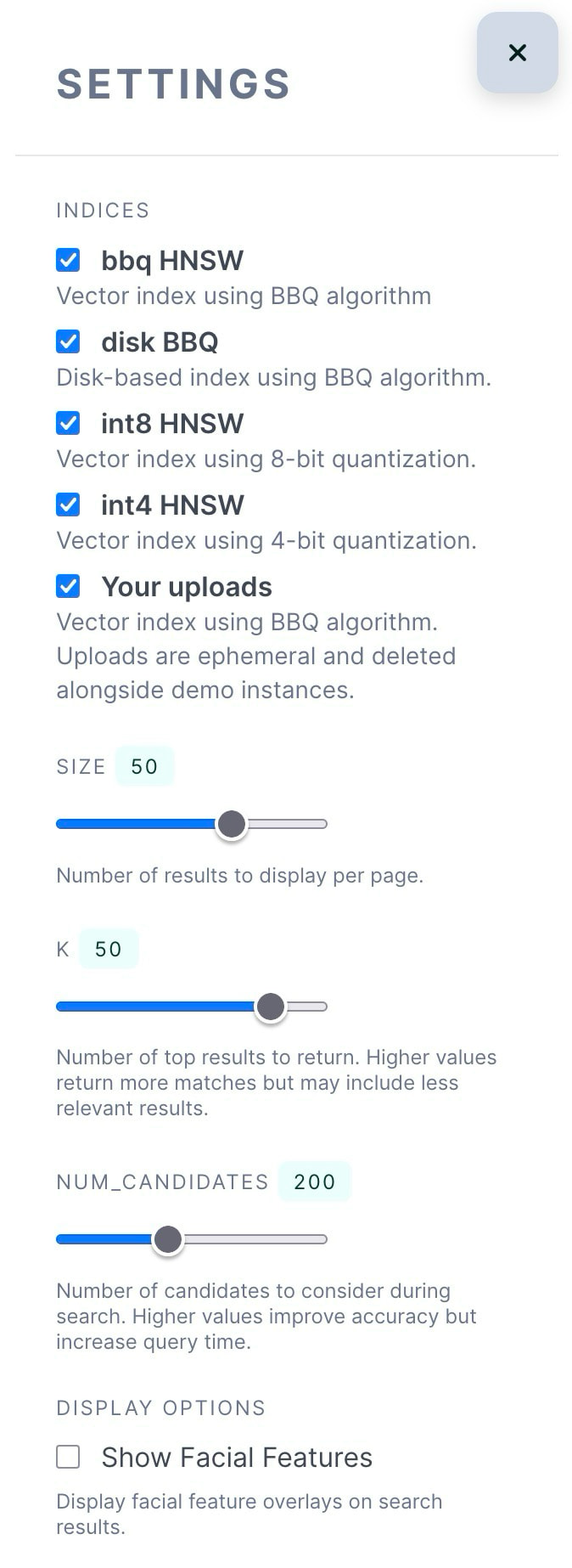
After changing these parameters note how latency and relevance change. At the bottom right corner, the box shows the top result and the latency of the two most important steps: embedding generation of your snapshot (camera or picture) and Elasticsearch - it would say something like "Elasticsearch: 50ms".
The scores go from 0 to 1, or 0% to 100% similarity since it’s easier to understand. For this dataset, a match higher than 0.75 can be considered positive, test for yourself.
Another interesting thing to look into is how much memory and disk each index is using, we can use Elasticsearch _stats API and issue these requests in Kibana:
GET faces-bbq_hnsw-10.15/_stats?filter_path=*.primaries.dense_vector

GET faces-disk_bbq-10.15/_stats?filter_path=*.primaries.dense_vector

GET faces-int8_hnsw-10.15/_stats?filter_path=*.primaries.dense_vector

GET faces-int4_hnsw-10.15/_stats?filter_path=*.primaries.dense_vector
Changing more parameters
While k and num_candidates can be changed for our queries, some quantization techique have special settings we can change. Take a look at the full list of settings here, some of them are applicable only at index time (like m, ef_construction), which would require a re-index, but some are applicable for query time as well.
Perhaps the most important one is oversample. It controls how many candidates are rescored using the original float vectors. With oversample: 3.0, the search retrieves num_candidates per shard using quantized vectors, then rescores the top k * oversample candidates with the original vectors before returning the final top k results. Higher values improve accuracy at the cost of additional computation.
For BBQ we can change it in the index mapping at rescore_vector.oversample:
PUT faces-bbq_hnsw-10.15/_mapping
{
  "properties": {
    "face_embeddings": {
      "type": "dense_vector",
      "dims": 512,
      "index": true,
      "similarity": "cosine",
      "index_options": {
        "type": "bbq_hnsw",
        "m": 16,
        "ef_construction": 100,
        "rescore_vector": {
          "oversample": 3
        }
      }
    }
  }
}
For DiskBBQ we can change rescore_vector.oversample and also default_visit_percentage which controls what percentage of clusters to visit during the search phase. Lower values trade accuracy for speed by visiting fewer clusters.
PUT faces-disk_bbq-10.15/_mapping
{
    "properties": {
        "face_embeddings": {
          "type": "dense_vector",
          "dims": 512,
          "index": true,
          "similarity": "cosine",
          "index_options": {
            "type": "bbq_disk",
            "cluster_size": 384,
            "default_visit_percentage": 0,
            "rescore_vector": {
              "oversample": 3
            }
          }
        }
    }
}
Again, after changing these, note how latency and relevance change.
Next Steps
Check the full documentation for setup instructions on how to index and run this demo on your own infrastructure.
Merry Christmas everybody, and happy BBQ'ing!