SamuelSMendes
November 6, 2025, 1:22pm
1
Once I’ve used the version 8.5 and we could overide the “agent.name” as well as add some tags in the documents generated by the service by editing the “mtricbeat.yaml” file. But as of now the document no longer exists and I’ve seen no other way to make the change happen.
I’d appreciate any help on the matter.
Hello @SamuelSMendes
I see below similar issue open as per your requirement :
opened 06:56PM - 02 Feb 22 UTC
enhancement
Team:Elastic-Agent-Control-Plane
**Use Case:** Currently the name attached to the agent is chosen by Elastic - as… in derived from some other entity (i.e machine name). Often these names have no significance to the user of our product who many need to better visually differentiate. In some instances the user is operating a multi tenanted environment and would like to encode the tenant name/ID into the agent name.
**Proposal:** Provide a flag for the user to overwrite the given name during installation/enrollment. This name should appear in the Fleet UI.
**Suggested syntax:**
elastic-agent enroll --url=https://<fleet server> --enrollment-token=<token> --name=”CEO laptop”
elastic-agent install --url=https://<fleet server> --enrollment-token=<token> --name=”CEO laptop”
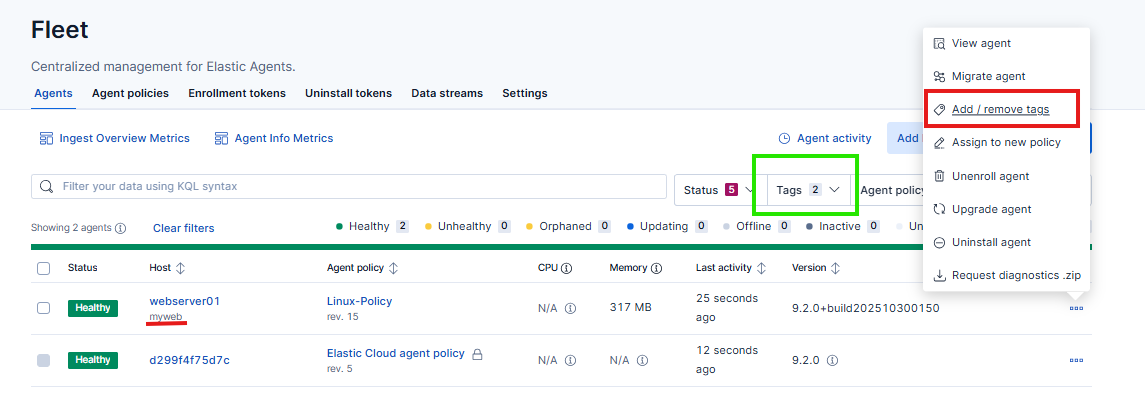
For now i believe you can make use of tags which is available to filter your agents :
Thanks!!
SamuelSMendes
November 10, 2025, 1:27pm
3
I see the option there but even once placed in the agent I can’t find any document with the new tag being adressed at.
Shouldn’t the new tag be added to the new documents generated by the agent?
Thanks for the quick answer.
leandrojmp
November 10, 2025, 1:37pm
4
No, this tag is only used for filtering on the Fleet console, they will not be added to documents.
SamuelSMendes
November 11, 2025, 1:09pm
5
Thank you for the reply @leandrojmp .
Is there any way I could get to the bottom of this? To change the “agent.name” or setup a tag to retrieve in the documents?