Hello,
I'm trying to use Logstash to load Oracle data to ES applying a specific template.
logstash version : 6.4.2
Here are the steps followed:
Step 1: retrieve data from Oracle and send them to ES without any template

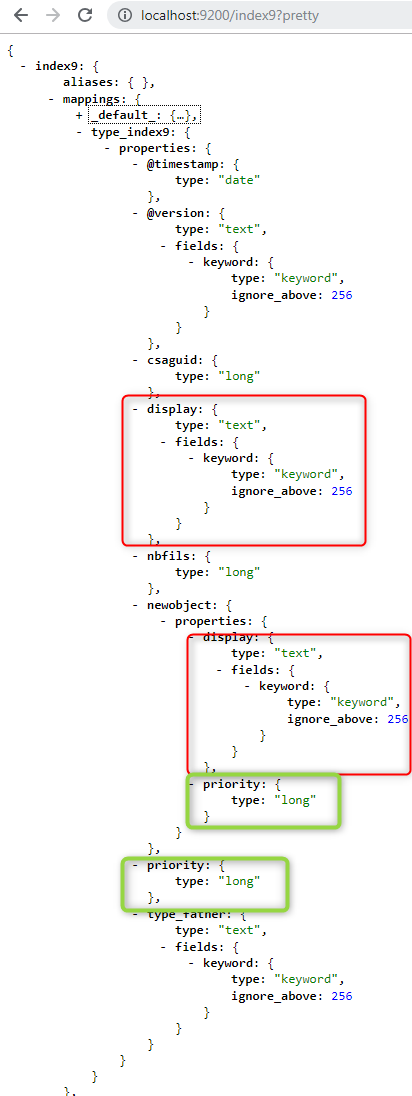
Step 2 : retrieve existing mapping in one file with cURL
curl –XGET http://localhost:9200/index9/_mapping?pretty > template9.json
Step 3 : adapt the mapping to do my template (red circled = what I’ve changed)
Step 4: load the template with cURL
Curl –XPUT –H “Content-type: application/json” http://localhost:9200/_template/index9?pretty –d @template9.json
Acknowledged = true
Step 5: drop existing ES index with cURL
curl –XDELETE http://localhost:9200/index9?pretty
ack = true
Step 6: Modify my logstash-config.conf file

Step 7 : launch logstash to load ES data
Logstash –f logstash.config.conf
No error detected within Logstash logs.
Step 8: results
Template looks good:
However I don’t get my “new object”,
all data are on the same level:

And the mapping seems different:
Anyone know what I’m missing ?
Hello,
can you provide your input code, which helps to give you solution
Hello !
Thank you for your help!
Here's the input part of my logstash-config.conf:
file: logstash-config.conf
input {
jdbc {
# Postgres jdbc connection string to our database, mydb
jdbc_connection_string => "jdbc:oracle:thin:@localhost:1521:DATABASE"
    # The user we wish to execute our statement as
    jdbc_user => "ROMAINROM"
	jdbc_password => "ROMAINROM"

    # The path to our jdbc driver for Oracle
    jdbc_driver_library => "xxxx\oracle-10g\ojdbc14.jar"

    # The name of the driver class for Oracle
    jdbc_driver_class => "Java::oracle.jdbc.driver.OracleDriver"


    # our query
    statement_filepath => "query.sql"

}
}
#filter {
json {
source => "message"
}
#}
Sorry about the presentation  ,
,
no filter applied.
The input code is fine, in the output did you mention elasticsearch to get the result,
Try this,
input {
jdbc {
jdbc_driver_library => "xxxx\oracle-10g\ojdbc14.jar"
jdbc_driver_class => "oracle.jdbc.driver.OracleDriver"
jdbc_connection_string => "jdbc:oracle:thin:@localhost:1521:DATABASE"
jdbc_user => "ROMAINROM"
jdbc_password => "ROMAINROM"
statement => "SELECT TOP 10 * FROM TABLE"
jdbc_paging_enabled => "true"
jdbc_page_size => "50000"
}
}
output{
elasticsearch { codec => json hosts => ["localhost:9200"] index => "index9" }
stdout { codec => rubydebug }
}
Well actually I got the output in ES
but ES data are not mapped according to my template...
I add like you said:
jdbc_paging_enabled => "true"
jdbc_page_size => "50000"
I haven't modified my query as it's an inner join that worked so far.
And tried both output (I deleted index9 before each test):
I have still the same issue:

Template is not applied...
You need to check with the query whether it is retrieving correct data from database or not. Please verify once.
My query looks like:
SELECT
TABLE1.CSAGUID,TABLE1.TYPE_FATHER,TABLE1.NBFILS,
TABLE2.PRIORITY,TABLE2.DISPLAY
FROM TABLE1
INNER JOIN TABLE2
ON TABLE1.FATHER_GUID=TABLE2.CSAGUID
This query gives 96 lines in Oracle DB and I also retrieve these 96 hits in ES DB,
all values seem correct so far.
So I think this query is correct.
can you display the output of this query,
http://localhost:9200/index9/_search
ok now can you please tell me what is the output you were expecting to be displayed
yes, like described in step 3 and step 8 above, I want to get the following template applied :
Unfortunately I do not get the "newobject" level...
Ok, I finally found a collleague of mine who told me that he had the same issue 2 years ago, so I give up templates with a logstash loading in ES...
I'm going to use the mutate option then.
And a script to read the data.