Hello,
i have a little question for canvas.
Here is my code:
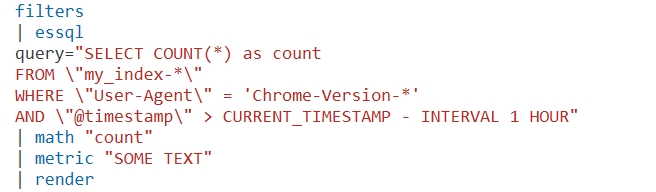
following line is important:

How can I use * in single quotes ?
When i use Chrome-Version-1 or Chrome-Version-2 everything is working fine.
Now I want to find every string that contains "Chrome-Version" (Chrome-Version-* is not working...)
Can someone please help me ? 
In visualizations i can just use the filter:
User-Agent: Chrome-Version-*
and it is working fine, how can i use it in canvas ?
Have you tried using double quote and escaping them?
WHERE \"User-Agent\" = \"Chrome-Version-*\"
Also, it would help if you posted the queries as a code block instead of images so they can be copy-pasted/searched. Thanks!
yes i already tried:
WHERE "User-Agent" = "Chrome-Version-*"
--> verification_exception: Unknown colum [Chrome-Version-*]
But as far as i know it should be or ? (field="" / value = '')
WHERE "User-Agent" = 'Chrome-Version-*'
--> parse error
sorry for that. I tried to use Blockquote and preformatted text but it will end in a picture 
EDIT: found out
here is my example:
filters
| essql
query="SELECT COUNT() as count
FROM "my_index-"
WHERE "User-Agent" = 'Chrome-Version-*'
AND "@timestamp" > CURRENT_TIMESTAMP - INTERVAL 1 HOUR"
| math "count"
| metric "SOME TEXT"
| render
Finally i found out my solution:
WHERE "User-Agent" LIKE 'Chrome-Version%'
Best regards