Cet article existe aussi en Français.

Building an AI-Powered Email Phishing Detection System with n8n and Elastic Agent Builder
Phishing attacks continue to dominate the cybersecurity threat landscape, with attackers increasingly using sophisticated social engineering techniques to bypass traditional filters. As a security practitioner working with Elastic technologies, I built an automated phishing detection and analytics system that combines n8n workflow automation with Elastic's AI-powered Agent Builder. This blog walks through the architecture, implementation, and real-world insights from analyzing 44 phishing emails over three months.
Why This Approach Works
Traditional rule-based email filters struggle with modern phishing campaigns that use contextual language and legitimate-looking formats. By leveraging large language models (LLMs) through Elastic's inference pipeline, we can analyze email semantics, extract malicious patterns, and categorize threats with accuracy exceeding 95%. The integration with n8n provides seamless automation, while Elastic Agent Builder enables security analysts to query results using natural language.
Getting Started with Elastic: If you're new to Elastic, check out the Getting Started guide to set up your deployment and begin exploring Elastic's search, observability, and security solutions.
Architecture Components
n8n Workflow Automation

The n8n workflow orchestrates the entire email processing pipeline in four stages:
The trigger node initiates execution when manually activated or on a schedule. The Gmail node ("Get many messages") connects to your Gmail account and retrieves unread emails using Gmail API. The Split in Batches node processes emails in configurable batch sizes (typically 10-50) to optimize throughput and prevent API throttling. The HTTP Request node sends each email to Elasticsearch via POST request to the ingest pipeline endpoint (
https://[your-cluster]:9200/fishfish/_doc?pipeline=phishingornotphishing).After successful indexing, the workflow marks emails as read in Gmail to prevent duplicate processing. This modular design follows n8n best practices by separating concerns and allowing each component to be tested independently.
You can find the n8n template here
Elasticsearch Ingest Pipeline
Before configuring the ingest pipeline, you must first set up an inference endpoint that connects to your AI model. Elastic simplifies this process by providing a unified API for managing inference services, whether you're using built-in models, Azure OpenAI, OpenAI, Cohere, Google AI, Anthropic, or other providers.
To create an inference endpoint, use the Elasticsearch API to register your service configuration. For Azure OpenAI, the endpoint configuration looks like this:
PUT _inference/completion/azure_openai_completion
{
  "service": "azureopenai",
  "service_settings": {
    "resource_name": "test-ai",
    "deployment_id": "gpt-4",
    "api_version": "2024-02-01",
    "api_key": "replacehere"
  }
}
Once registered, the inference endpoint becomes available throughout your Elasticsearch cluster. You can reference it in ingest pipelines, search queries, or any other Elasticsearch operation that requires AI inference. This centralized approach eliminates the need to manage API credentials and connection details in multiple places—Elastic handles authentication, rate limiting, and error handling transparently.
Index Mapping with Semantic Search Fields
Before ingesting data, you must define an index mapping that specifies which fields support semantic search. Elastic simplifies this process with the semantic_text field type, which automatically handles embedding generation and inference at ingestion time. Unlike traditional vector fields that require manual pipeline configuration, semantic_text fields provide sensible defaults and eliminate the need for complex inference pipeline setup.
In the fishfish index, key fields like content.semantic and subject.semantic are configured as semantic_text fields, enabling semantic search capabilities. These fields automatically generate embeddings using the specified inference endpoint (in this case, .multilingual-e5-small-elasticsearch for multilingual text embedding) during document indexing. The mapping configuration looks like this:
{
  "fishfish": {
    "mappings": {
      "properties": {
        "category": {
          "type": "keyword"
        },
        "content": {
          "type": "text",
          "fields": {
            "semantic": {
              "type": "semantic_text",
              "inference_id": ".multilingual-e5-small-elasticsearch"
            }
          }
        },
        "date": {
          "type": "date"
        },
        "extracted_data": {
          "properties": {
            "category": {
              "type": "keyword"
            },
            "date": {
              "type": "date"
            },
            "reasoning": {
              "type": "text"
            },
            "urls": {
              "type": "text"
            }
          }
        },
        "from": {
          "type": "keyword"
        },
        "model_id": {
          "type": "keyword"
        },
        "output": {
          "type": "text"
        },
        "reasoning": {
          "type": "text",
          "fields": {
            "semantic": {
              "type": "semantic_text",
              "inference_id": ".multilingual-e5-small-elasticsearch"
            }
          }
        },
        "requirements_prompt": {
          "type": "text"
        },
        "subject": {
          "type": "text",
          "fields": {
            "semantic": {
              "type": "semantic_text",
              "inference_id": ".multilingual-e5-small-elasticsearch"
            }
          }
        },
        "timestamp": {
          "type": "date"
        }
      }
    }
  }
}
With semantic_text fields, Elastic automatically generates embeddings during ingestion without requiring explicit inference pipeline processors. This means documents indexed to the fishfish index automatically have semantic embeddings created for content.semantic, subject.semantic, and reasoning.semantic fields, enabling semantic search queries that understand meaning and context rather than just exact keyword matches.
The phishingornotphishing ingest pipeline then performs intelligent categorization using the pre-configured Azure OpenAI completion model:
PUT _ingest/pipeline/phishingornotphishing
{
  "description": "Categorize email in 3 categories: valid,marketing,phishing",
  "processors": [
    {
      "set": {
        "field": "requirements_prompt",
        "value": """
           You are a cybersecurity analyst. Extract and categorize the following email data. Return ONLY valid JSON with no additional text.

Input data:
- Content: {{content}}
- Subject: {{subject}}
- Authors: {{from}}
- Date: {{date}}

Requirements:
1. Set the date field to ISO8601 format
2. Extract all URLs from the Content field. Extract it from HTLM code if needed
3. Categorize the email as one of: "valid", "marketing", or "phishing" based on Content, Subject, and authors
4. Explaing your reasoning
5. Return JSON with these fields: date, urls, category

JSON format:
{
  "date": "ISO8601_date_here",
  "urls": ["url1", "url2"],
  "category": "valid|marketing|phishing",
  "reasoning": "reasoning_here"
}
            """,
        "ignore_failure": true
      }
    },
    {
      "inference": {
        "model_id": "azure_openai_completion",
        "input_output": [
          {
            "input_field": "requirements_prompt",
            "output_field": "output"
          }
        ]
      }
    },
    {
      "json": {
        "field": "output",
        "target_field": "extracted_data",
        "ignore_failure": false
      }
    },
    {
      "set": {
        "field": "category",
        "value": "{{extracted_data.category}}",
        "ignore_empty_value": true,
        "ignore_failure": true
      }
    },
    {
      "set": {
        "field": "timestamp",
        "value": "{{extracted_data.date}}",
        "ignore_empty_value": true,
        "ignore_failure": true
      }
    },
    {
      "set": {
        "field": "urls",
        "copy_from": "{{extracted_data.urls}}",
        "ignore_empty_value": true,
        "ignore_failure": true
      }
    },
    {
      "set": {
        "field": "reasoning",
        "copy_from": "{{extracted_data.reasoning}}",
        "ignore_empty_value": true,
        "ignore_failure": true
      }
    }
  ]
}
The set processor constructs a detailed prompt instructing the LLM to act as a cybersecurity analyst. It includes email metadata (content, subject, sender, date) as context variables. The inference processor calls the Azure OpenAI model, which analyzes the email semantically to detect phishing indicators like urgency, suspicious URLs, and social engineering tactics. The AI extracts URLs from both plain text and HTML markup, normalizes dates to ISO8601 format, assigns a category (valid/marketing/phishing), and provides human-readable reasoning. Finally, the json processor parses the AI's response and maps fields to searchable document properties.This semantic approach outperforms keyword-based filters by understanding context, intent, and linguistic patterns used in phishing campaigns.
Elastic Agent Builder Configuration
Learn More: For detailed setup instructions and configuration options, see the Elastic Agent Builder Get Started guide.
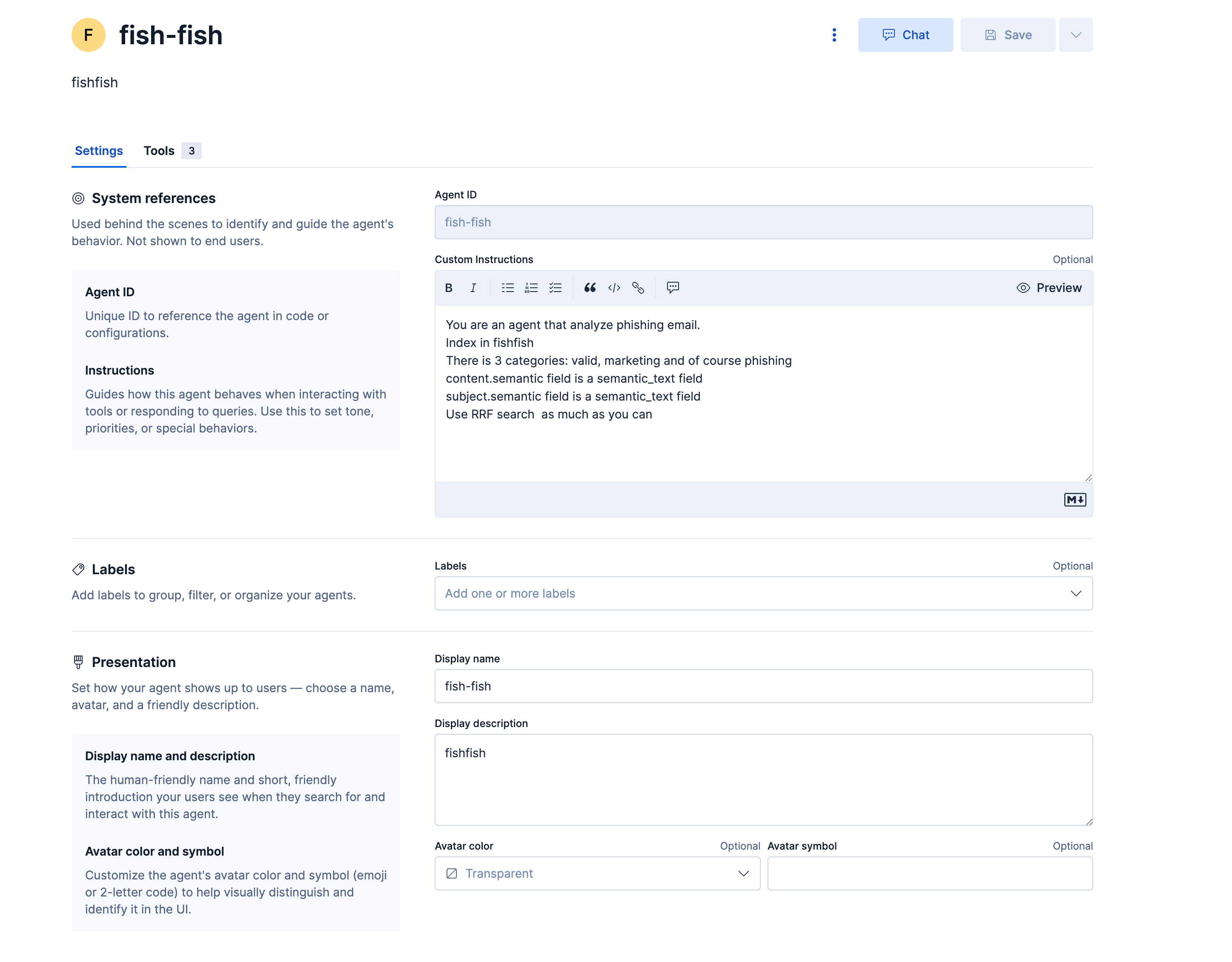
The "fish-fish" agent provides an interactive interface for security analysts to query phishing data conversationally:
System Instructions define the agent's role: "You are an agent that analyze phishing email. Index in fishfish. There is 3 categories: valid, marketing and of course phishing content.semantic field is a semantic_text field subject.semantic field is a semantic_text field. Use RRF search as much as you can".

The agent has access to three platform tools:
platform.core.execute_esql executes ES|QL queries against the fishfish index, platform.core.generate_esql converts natural language questions into ES|QL syntax, and platform.core.get_index_mapping retrieves index structure and field types.
Semantic search fields (content.semantic and subject.semantic) enable vector similarity searches that find conceptually related emails beyond exact keyword matches. These fields use the semantic_text type configured in the index mapping, which automatically generates embeddings during document ingestion. The agent uses Reciprocal Rank Fusion (RRF) to combine results from multiple search strategies for improved accuracy.
Built-in Integration Servers
Elastic Agent Builder comes with two built-in integration servers that enable seamless connectivity with external AI clients and agent-to-agent communication:
Model Context Protocol (MCP) Server provides a standardized interface for external clients to access Elastic Agent Builder tools. The MCP server is available at {KIBANA_URL}/api/agent_builder/mcp and allows AI clients like Claude Desktop, Cursor, and VS Code extensions to interact with your Elastic tools through JSON-RPC 2.0. To connect, configure your client with your Kibana URL and an API key that includes the read_onechat and space_read application privileges. This enables security analysts to query phishing data directly from their preferred AI development environments without switching between tools.
Agent-to-Agent (A2A) Server enables agent-to-agent communication following the A2A protocol specification. It provides endpoints for external A2A clients to interact with Elastic Agent Builder agents, facilitating communication between different AI agents in your security infrastructure. The Agent Card endpoint (GET /api/agent_builder/a2a/{agentId}.json) returns metadata for a specific agent, while the A2A Protocol endpoint (POST /api/agent_builder/a2a/{agentId}) handles agent-to-agent interactions. Both endpoints require API key authentication, ensuring secure communication between distributed security agents.
These built-in servers eliminate the need for custom integration code, allowing organizations to extend their phishing detection system by connecting Elastic Agent Builder with other AI-powered security tools, workflow automation platforms, and multi-agent systems. This creates opportunities for advanced use cases like automated threat intelligence sharing, cross-platform security orchestration, and distributed agent collaboration.
Real-World Analytics and Insights

After processing 44 phishing emails over three months, the system revealed critical attack patterns and trends.
Attack Pattern Analysis
Free Gift/Prize Scams dominated at 40% of all phishing attempts. These emails used French subject lines like "Récupérez votre cadeau" (Claim your gift) and "Vous avez gagné..." (You have won...). Common lures included Parkside/Lidl tool sets, Lancôme beauty boxes, Silvercrest appliances, Tefal kitchen products, iPhone 17 Pro Max, and RYOBI tool packs. The attacks created urgency by claiming limited availability or expiring offers.
Package Delivery Scams accounted for 30% of phishing emails. These featured subject lines like "Vous avez (1) colis en attente de livraison" (You have a package waiting for delivery). Tactics included claiming suspended packages, demanding unpaid customs fees, requesting immediate action to "schedule delivery," and using fake tracking codes to appear legitimate.Order Confirmation Scams represented 15% of attempts. These sent fake order confirmations with order numbers like "commande n°[48754-13] confirmée". They created confusion about items not purchased and included urgency to verify orders quickly.
Account Verification Scams comprised 10% of phishing emails. These used subject lines like "Vérification KYC" or "Important: Confirmez votre compte". They requested immediate account verification and threatened account suspension if not completed.
Category Distribution

The Agent Builder query "What is the ration between real phishing and fake phishing?" revealed the overall email composition:
Phishing emails: 51 (59.3%) identified as malicious threats requiring immediate action. Marketing emails: 23 (26.74%) legitimate promotional content but potentially unwanted. Valid emails: 12 (13.95%) genuine correspondence from trusted sources.
The ratio of 1.46:1 phishing-to-legitimate emails demonstrates the severity of the threat landscape. For every legitimate email, the system detected approximately 1.46 phishing attempts.
Conclusion
This integration of n8n, Elasticsearch, and AI-powered analysis creates a robust phishing detection pipeline that processes emails in real-time, categorizes threats with semantic understanding, and provides actionable intelligence through conversational queries. The system's modular design allows each component to be optimized independently while maintaining end-to-end automation.Organizations implementing similar architectures can expect reduced incident response times through automated triage, lower false positive rates via semantic analysis, better visibility into attack patterns and trends, and reduced analyst workload by automating routine classification tasks. As phishing attacks continue evolving, combining workflow automation with AI inference provides a scalable, maintainable approach to email security that adapts to emerging threats.