
Entity Risk Scoring now offers even more control! We've extended customization options, so you can easily tailor risk calculations based on alerts and the asset criticality of your users, hosts, and services. It's now simpler to align scoring with your specific organizational needs.
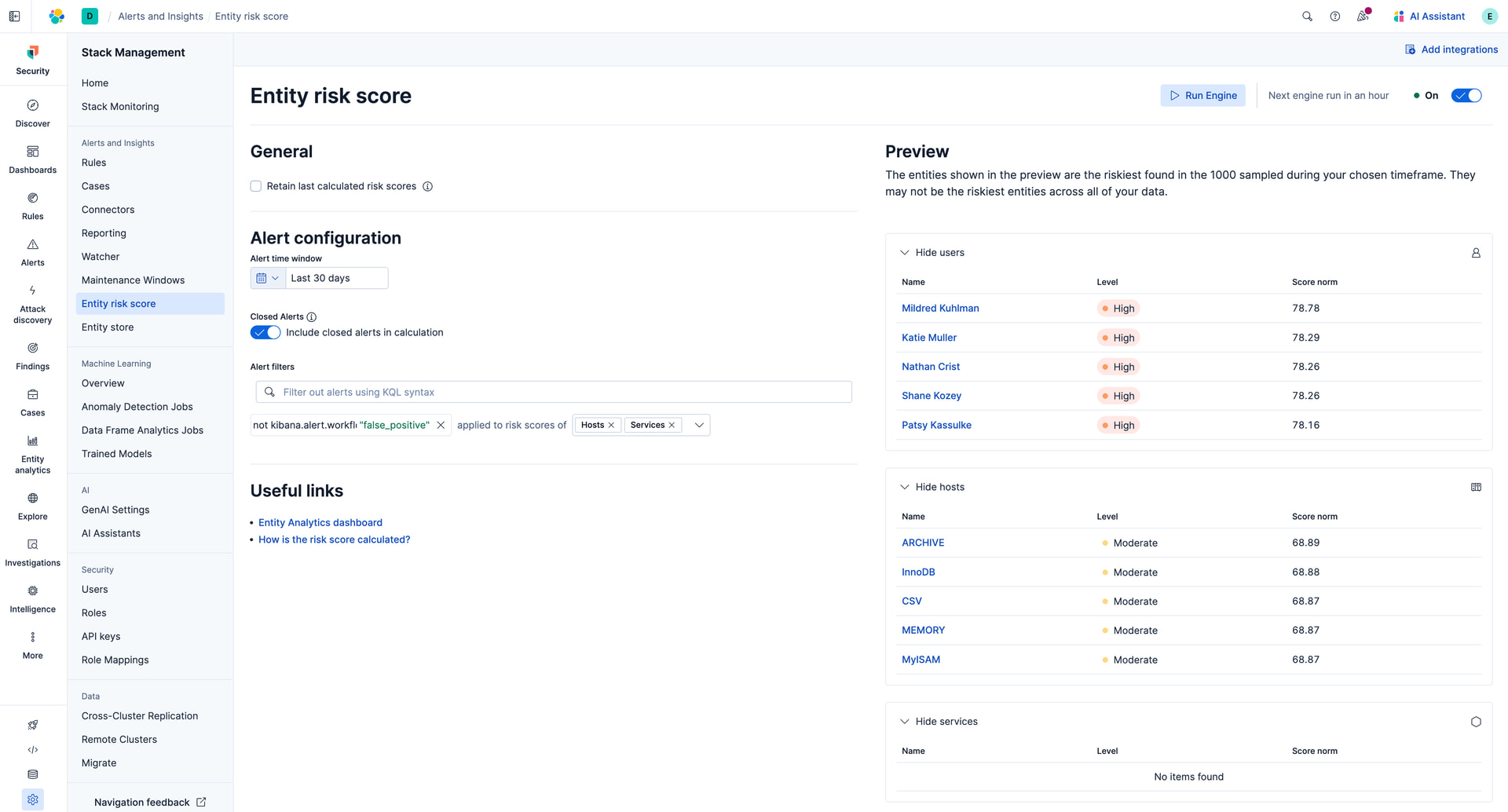
Alert Filters
In Kibana 9.2.0 you can control which alerts will be considered when calculating the risk score using:
-
Alert time window picker - Select how far we should look back when selecting alerts for risk scoring (default 30 day look-back)
-
Closed alerts selector - Choose whether closed alerts will be included in the risk score calculation
Now in serverless and the upcoming 9.3.0 release, you will be able to use any KQL filter to control the alerts that will be used for risk scoring. You can set filters per entity type and set as many filters as you want, we use “and” logic when combining multiple filters.You can use the alert JSON viewer to see which fields alerts have to filter on.

Use the preview view to see the effect of your changes to the risk engine configuration instantly. Here are just a few ideas for how to use filtering to tailor your risk scoring:
Consider Closed Alerts But Not False Positives
By selecting “Include closed alerts in calculation” all closed alerts will be considered, if we want to not include alerts which were closed with the reason “False Positive” we can add the following filter not kibana.alert.workflow_reason : "false_positive" and they will not be included.
Filter Out Alerts Based on Asset Criticality Level
Asset criticality allows you to classify your assets using their impact level. Alerts are annotated with the asset criticality level of the entity at the time the alert was raised.
Low impact entities already have their risk score weakened, it might be that you do not want to include alerts for low impact hosts at all, this can be achieved with the filter not host.asset.criticality: "low_impact".
Filter Out Specific Entities
It might be that there are specific entities which you do not wish to generate a risk score for, we can use the user.name host.name and service.name fields on alerts to exclude these entities. For example not host.name "some_host".
Filter Out Specific Rules
If there are rules which you do not wish to contribute to risk scoring, you can get their rule ID and then filter them out like so not kibana.alert.rule.uuid: "3e7d8860-bf28-43b8-8bbf-6d4fccd78158".
Risk Score Resetting
In Kibana v9.2.0, entity risk scores will now default to zero if an entity has no active alerts within the lookback window. This is a change from versions before Kibana 9.2.0, where the score would persist as the last calculated value even after all alerts had expired. Use the ”Retain last calculated risk scores” toggle to configure this behaviour to suit your needs.
We would love to hear from you!
Please join us and share any custom configurations and feedback you have in the #security-entity-analytics Elastic Community Slack Channel.