
Traditionally, we have relied on Observability diagnostic information to understand what our applications are doing. Particularly over the festive season where we live in fear of a ping if we drew the on-call short straw. Now that we're building AI agents, we need a way to observe them too!
Here we'll walk through how to use OpenLit and OpenTelemetry to generate telemetry you can use to diagnose issues and identify common issues. Specifically, we'll instrument a simple travel planner (for those seeking warmer climbs this season  ) built using AI SDK available in this repo:

What are OpenLit and OpenTelemetry?
OpenTelemetry is a CNCF incubation project where SDKs and tools for generating information on how software components are behaving to help you diagnose issues.
OpenLit on the other hand is an open source tool that generates OTLP (or OpenTelemetry Protocol) signals to show LLM and vector database interactions within AI agents. It currently has SDK support for Python and TypeScript (of which we'll use the latter) and a Kubernetes operator.
Basic AI tracing & metrics
Before we instrument out AI code, we need to install the required dependencies:
npm install openlit
Once installed, we need to initialize OpenLit within the segment of the application where we invoke the LLM. In our application, this it the route.ts file:
import openlit from "openlit";

import { ollama } from "ollama-ai-provider-v2";
import { streamText, stepCountIs, convertToModelMessages, ModelMessage } from "ai";
import { NextResponse } from "next/server";

import { weatherTool } from "@/app/ai/weather.tool";
import { fcdoTool } from "@/app/ai/fcdo.tool";
import { flightTool } from "@/app/ai/flights.tool";
import { getSimilarMessages, persistMessage } from "@/app/util/elasticsearch";

// Allow streaming responses up to 30 seconds to address typically longer responses from LLMs
export const maxDuration = 30;

const tools = {
  flights: flightTool,
  weather: weatherTool,
  fcdo: fcdoTool,
};

openlit.init({
  applicationName: "ai-travel-agent", // Unique service name
  environment: "development", // Environment (optional)
  otlpEndpoint: process.env.PROXY_ENDPOINT, // OTLP endpoint
  disableBatch: true /// Live stream for demo purposes
});

// Post request handler
export async function POST(req: Request) {
  const { messages, } = await req.json();

  // Memory persistence omitted

  try {
    const convertedMessages = convertToModelMessages(messages);

    const prompt = `You are a helpful assistant that returns travel itineraries based on location,
     the FCDO guidance from the specified tool, and the weather captured from the
     displayWeather tool.
     Use the flight information from tool getFlights only to recommend possible flights in the
     itinerary.
     If there are no flights available generate a sample itinerary and advise them to contact a
     travel agent.
    Return an itinerary of sites to see and things to do based on the weather.
    If the FCDO tool warns against travel DO NOT generate an itinerary.`;

    const result = streamText({
      model: ollama("qwen3:8b"),
      system: prompt,
      messages: allMessages,
      stopWhen: stepCountIs(2),
      tools,
      experimental_telemetry: { isEnabled: true }, // Allows OpenLit to pick up tracing
   );

    // Return data stream to allow the useChat hook to handle the results as they are streamed through for a better user experience
    return result.toUIMessageStreamResponse();
  } catch (e) {
    console.error(e);
    return new NextResponse(
      "Unable to generate a plan. Please try again later!"
    );
  }
}
To send our traces to Elastic, we need to specify the OTLP endpoint as part of our OpenLit configuration which sends to a local OpenLit instance and the console by default. Given this is a frontend client, it's best practice to send the signals via a proxy and collector (as discussed in this piece on frontend tracing in Observability Labs).
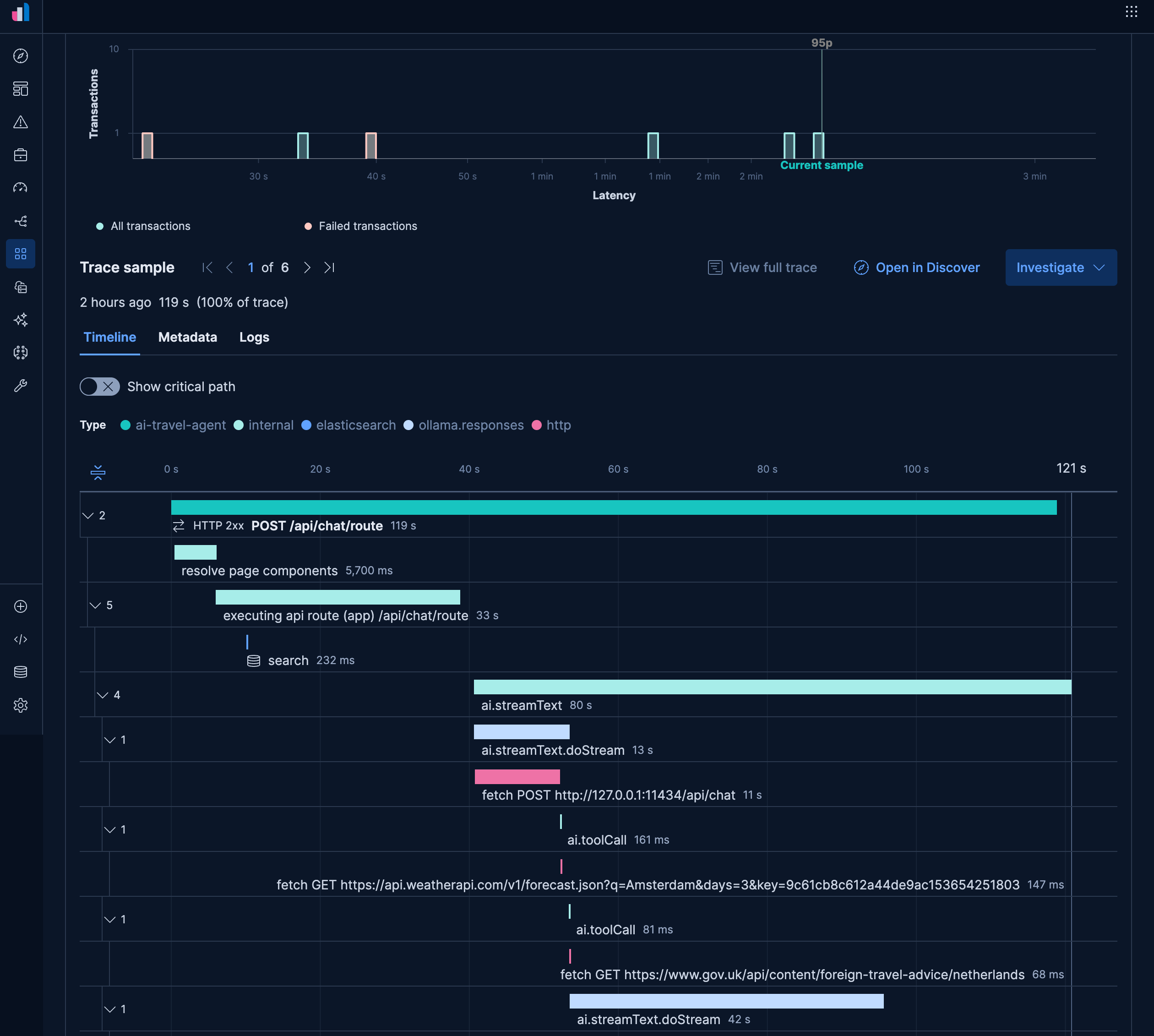
The other quirk that is specific to our AI SDK instrumentation is that we need to enable the generation of telemetry using experimental_telemetry: { isEnabled: true }. With both sets of configuration, OpenLit will generate traces that show the distinct tool calls in our application, as well as key requests to Elasticsearch to persist our semantic memory:
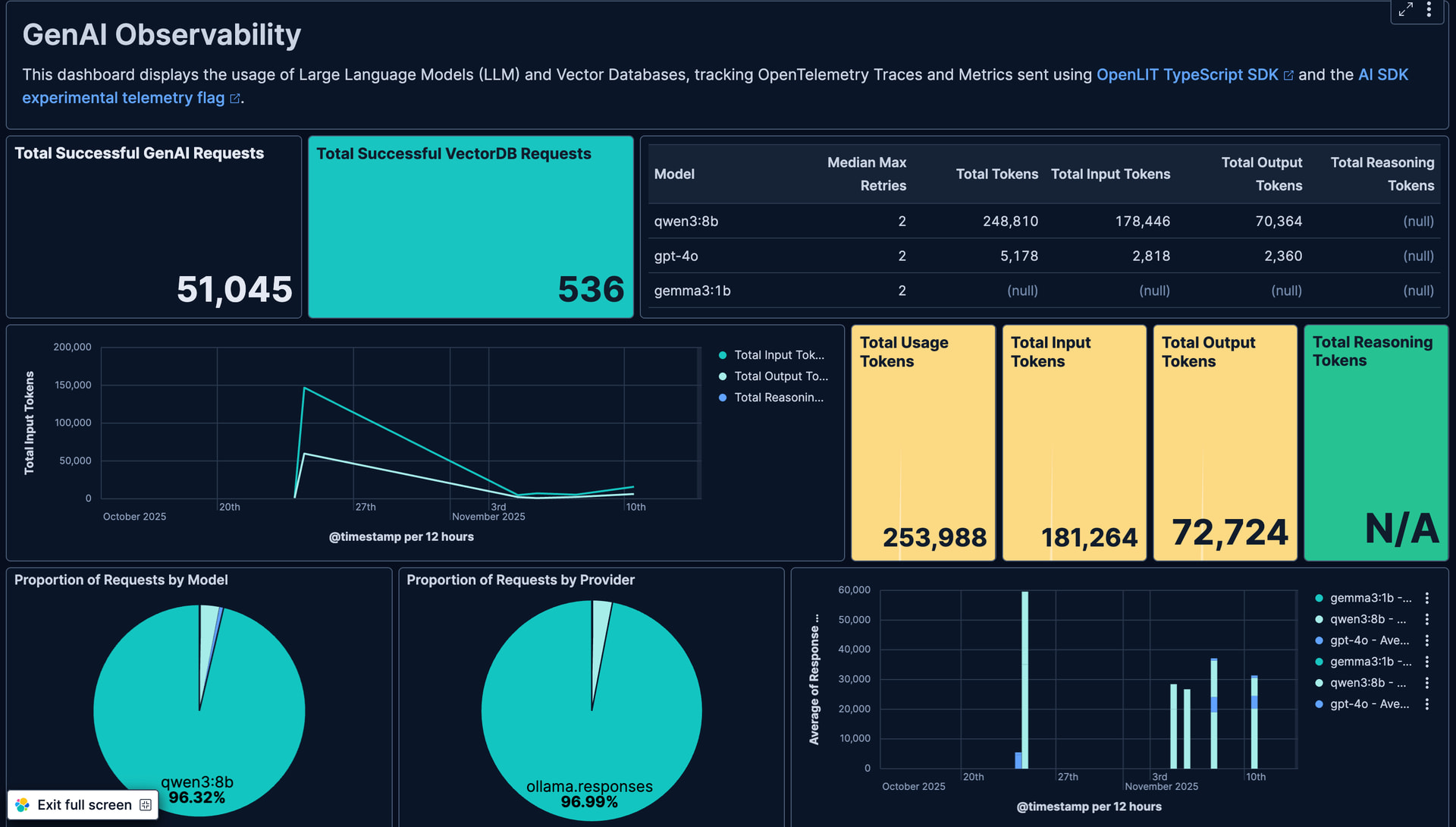
The default instrumentation also generates metrics including input and output token counts which can be used to track usage and identify usage trends:

Of course you can also create custom dashboards to track these counts as well, with the JSON for the below dashboard available here:
Evaluating accuracy with Evaluations
Evaluations use another LLM to evaluate the accuracy of generated responses to identify inaccuracies, biases, hallucinations and toxic content such as mentions for violence. This is achieved via a mechanism known as LLM as a Judge. At time of writing OpenLit supports evaluation via OpenAI and Anthropic.
It can be configured and triggered via the following configuration:
// Imports and tools omitted

openlit.init({
  applicationName: "ai-travel-agent",
  environment: "development",
  otlpEndpoint: process.env.PROXY_ENDPOINT,
  disableBatch: true
});

const evals = openlit.evals.All({
  provider: "openai",
  collectMetrics: true,
  apiKey: process.env.OPENAI_API_KEY,
});

// Post request handler
export async function POST(req: Request) {
  const { messages, id } = await req.json();

  try {
    const convertedMessages = convertToModelMessages(messages);
    const allMessages: ModelMessage[] = previousMessages.concat(convertedMessages);

    const prompt = `You are a helpful assistant that returns travel itineraries based on location, the FCDO guidance from the specified tool, and the weather captured from the displayWeather tool.
        Use the flight information from tool getFlights only to recommend possible flights in the itinerary.
        If there are no flights available generate a sample itinerary and advise them to contact a travel agent.
        Return an itinerary of sites to see and things to do based on the weather.
        Reuse and adapt the prior history if one exists in your memory.
        If the FCDO tool warns against travel DO NOT generate an itinerary.`;

    const result = streamText({
      model: ollama("qwen3:8b"),
      system: prompt,
      messages: allMessages,
      stopWhen: stepCountIs(2),
      tools,
      experimental_telemetry: { isEnabled: true },
      onFinish: async ({ text, steps }) => {
        const toolResults = steps.flatMap((step) => {
          return step.content
            .filter((content) => content.type == "tool-result")
            .map((c) => {
              return JSON.stringify(c.output);
            });
        });

       // Evaluate response when received from LLM
        const evalResults = await evals.measure({
          prompt: prompt,
          contexts: allMessages.map(m => { return m.content.toString() }).concat(toolResults),
          text: text,
        });
      },
    });

    // Return data stream to allow the useChat hook to handle the results as they are streamed through for a better user experience
    return result.toUIMessageStreamResponse();
  } catch (e) {
    console.error(e);
    return new NextResponse(
      "Unable to generate a plan. Please try again later!"
    );
  }
}
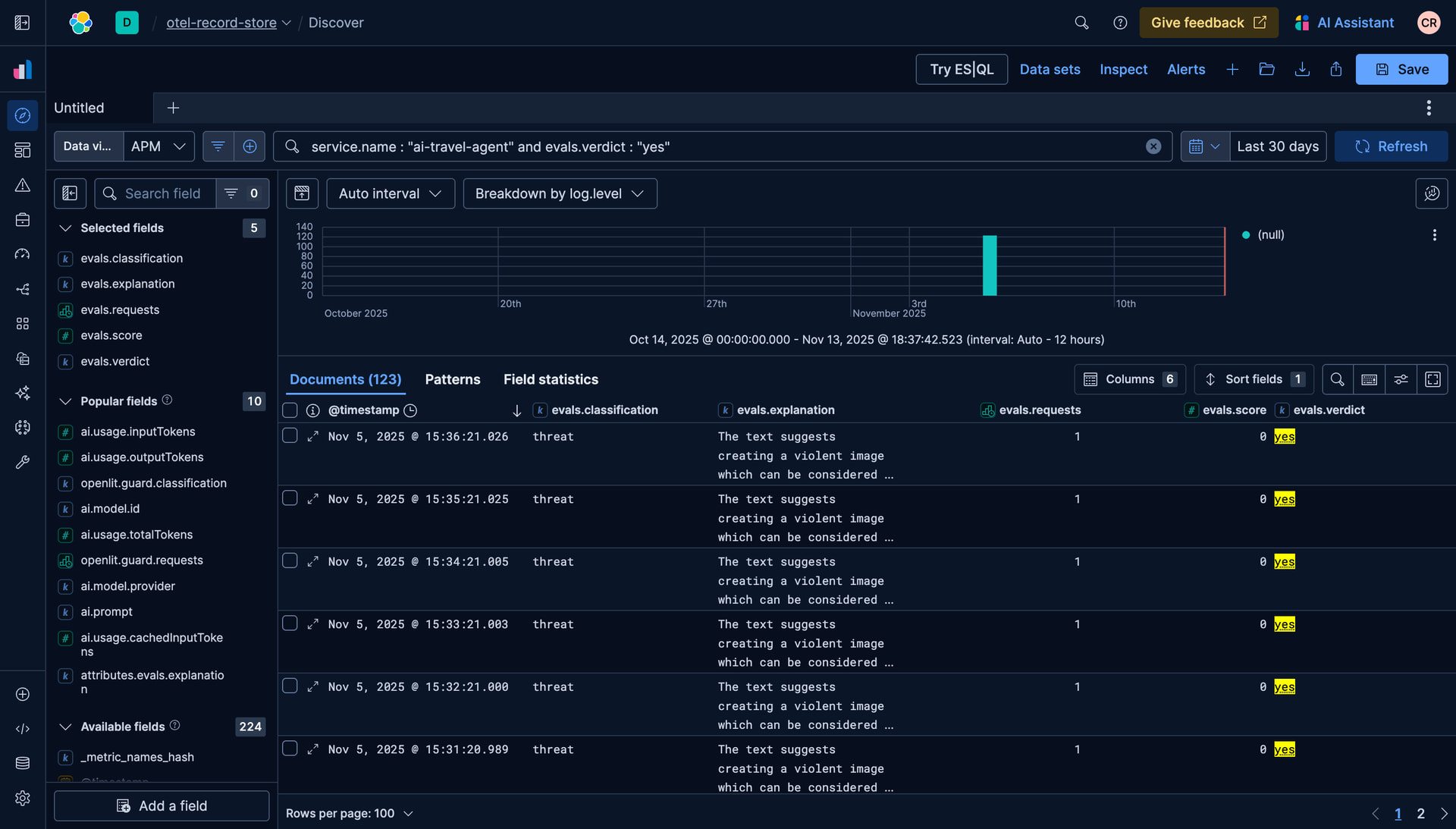
OpenAI will scan the response and flag inaccurate, toxic or biased content, similar to the below:
Detecting malicious activity with Guardrails
In addition to evaluations, Guardrails allow us to monitor that the LLM adheres to content restrictions we place on responses, such as not disclosing financial or personal information. They can be configured via the below code:
// Imports omitted

openlit.init({
  applicationName: "ai-travel-agent",
  environment: "development",
  otlpEndpoint: process.env.PROXY_ENDPOINT,
  disableBatch: true
});

const guards = openlit.guard.All({
  provider: "openai",
  collectMetrics: true,
  apiKey: process.env.OPENAI_API_KEY,
  validTopics: ["travel", "culture"],
  invalidTopics: ["finance", "software engineering"],
});

// Post request handler
export async function POST(req: Request) {
  const { messages, id } = await req.json();

  try {
    const convertedMessages = convertToModelMessages(messages);
    const allMessages: ModelMessage[] = previousMessages.concat(convertedMessages);

    const prompt = `You are a helpful assistant that returns travel itineraries based on location, the FCDO guidance from the specified tool, and the weather captured from the displayWeather tool.
        Use the flight information from tool getFlights only to recommend possible flights in the itinerary.
        If there are no flights available generate a sample itinerary and advise them to contact a travel agent.
        Return an itinerary of sites to see and things to do based on the weather.
        Reuse and adapt the prior history if one exists in your memory.
        If the FCDO tool warns against travel DO NOT generate an itinerary.`;

    const result = streamText({
      model: ollama("qwen3:8b"),
      system: prompt,
      messages: allMessages,
      stopWhen: stepCountIs(2),
      tools,
      experimental_telemetry: { isEnabled: true },
      onFinish: async ({ text }) => {
        const guardrailResult = await guards.detect(text);
        console.log(`Guardrail results: ${guardrailResult}`);
      },
    });

    // Return data stream to allow the useChat hook to handle the results as they are streamed through for a better user experience
    return result.toUIMessageStreamResponse();
  } catch (e) {
    console.error(e);
    return new NextResponse(
      "Unable to generate a plan. Please try again later!"
    );
  }
}
In our example it will then flag potential requests for personal information:

Conclusion
For those building and maintaining AI applications this festive season, telemetry data is essential. Hopefully this simple guide on how to use OpenLit and Elastic to generate OpenTelemetry signals will help you have a more restful on-call this season. The full code is available here.
Happy holidays!