[indices:admin/create] is unauthorized for user Elastic Stack

I have read through many articles and am not able to solve this issue for me. I’m trying to generate a new api key that has rights over creating indicies using filebeat. I have tried doing this through the superuser account but per the below post, it is not an option anymore so I created a new account with no roles and just an api key with the proper permissions but still getting the error

this action is granted by the index privileges [auto_configure,create_index,manage,all]"}, dropping event!"

Below is the configuration I used to grant permissions for a a different user beside the default elastic user

POST /_security/api_key
{
"name": "test-key",
"role_descriptors": {
"filebeat_writer": {
"cluster": ["monitor", "read_ilm", "read_pipeline"],
"index": [
        {
"names": ["*-*"],
"privileges": ["auto_configure","create_index","manage","all"]
        }
      ]
    }
  }
}

Any help is appreciated as I have been trying to solve this for a few weeks now.

Hi @frahmn Welcome to the community

I think perhaps you're confusing a few topics.

First, the article you listed below has nothing to do with the API keys and filebeat.

That article refers to the user that Kibana uses to connect with Elasticsearch. In previous versions. You could use the elastic user but that's no longer an option.

So let's put that aside

Please always include the version of the stack you are working with... So what version are you on?

Now you should just log in as the elastic user and create the filebeat writer API key as defined in the documentation.

Then please show us how you're configuring file be with this API key...

And what command are you running when you get that error.

Were you running setup?
Or just trying to start filebeat.

If you created a new user with no roles that will probably not work as an API key is an intersection of the roles of the users that created it with the roles defined in the API key. I just wrote this up in another topic..

So log in with the elastic user and create the API key

Show us the versions
Show us the configuration
Show us the command you're running
And the result

Thank you for the response, Stephen.

Below is the information you requested:

Versions:
Filebeat: filebeat version 9.2.0 (amd64), libbeat 9.2.0 [09b547febe1cc9102a5d3f80ac8fbf68a5fd84f5 built 2025-10-20
Kibana: ServiceVersion: 9.2.0, ecs.version: 8.10.0, agentVersion:4.13.0
Elastic: Version: 9.2.0, Build: deb/25d88452371273dd27356c98598287b669a03eae/2025-10-21T10:06:21.288851013Z, JVM: 25

For the configuration – I have a user with a custom role with the following permissions

For the same user that has the above role assigned, here is the API key the configuration

{
  "filebeat_writer": {
"cluster": [
"monitor",
"read_ilm",
"read_pipeline"
    ],
"indices": [
      {
"names": [
"*-*"
        ],
"privileges": [
"auto_configure",
"create_index",
"manage",
"all"
        ],
"allow_restricted_indices": false
      }
    ],
"applications": [],
"run_as": [],
"metadata": {},
"transient_metadata": {
"enabled": true
    }
  }
}

I was starting the service on the command line with filebeat -e -d “*” which gave me the following output in the filebeat-event log file when the index failed to be created

"reason":"action [indices:admin/auto_create] is unauthorized for API key id [<redacted>] of user [<redacted>] , this action is granted by the index privileges [auto_configure,create_index,manage,all]"}, dropping event!","service.name":"filebeat","log.type":"event","ecs.version":"1.6.0"}

Thank you for your help as always.

Hi @frahmn

I have a suggestion.

  1. Please first try creating the API key from the elastic user and see if that work (not your user with the role you just created) and see if that works, I suspect it will.

Side note, not sure why you put the following

"names": [ "*-*"] instead of filebeat-* as recommended.

  1. I suspect your issue is perhaps that your new user / role you created does not have the correct permissions to actually create a valid API Key. That role needs cluster privilege

Required authorization

  • Cluster privileges: manage_own_api_key

Also while you are at it, you should read the section on how the resulting privileges are calculated

role_descriptors object

An array of role descriptors for this API key. When it is not specified or it is an empty array, the API key will have a point in time snapshot of permissions of the authenticated user. If you supply role descriptors, the resultant permissions are an intersection of API keys permissions and the authenticated user's permissions thereby limiting the access scope for API keys. The structure of role descriptor is the same as the request for the create role API. For more details, refer to the create or update roles API.

NOTE: Due to the way in which this permission intersection is calculated, it is not possible to create an API key that is a child of another API key, unless the derived key is created without any privileges. In this case, you must explicitly specify a role descriptor with no privileges. The derived API key can be used for authentication; it will not have authority to call Elasticsearch APIs.

Thank you @stephenb. That is how I started with generating an API key using the elastic user but kept getting the same error insufficient privileges. I also had it set to filebeat-* before I did *-* but was seeing the same behavior.

I will change it back to the elastic user API key and share the error again.

Update:

log.logger":"elasticsearch","log.origin":{"function":"``github.com/elastic/beats/v7/libbeat/outputs/elasticsearch.NewClient.func3","file.name":"elasticsearch/client.go","file.line":179},"message":"Failed`` to index 1600 events in last 10s: events were dropped! Look at the event log to view the event and cause.","service.name":"filebeat","ecs.version":"1.6.0"}

Ouput from filebeat-event log file:

type":"filebeat","version":"9.2.0","ephemeral_id":"8eaa8ff5-fad4-4a14-8c61-ee30d4aa0497","id":"043906f4-801e-4d86-b28a-07d4565ba0a4"}}\n, Meta: none' (status=403): {"type":"security_exception","reason":"action [indices:admin/auto_create] is unauthorized for API key id [<redacted>] of user [elastic] , this action is granted by the index privileges [auto_configure,create_index,manage,all]"}, dropping event!","service.name":"filebeat","log.type":"event","ecs.version":"1.6.0"}

Output of new elastic API key

{
  "filebeat_writer": {
"cluster": [
"monitor",
"read_ilm",
"read_pipeline"
    ],
"indices": [
      {
"names": [
"filebeat-*"
        ],
"privileges": [
"auto_configure",
"create_index",
"manage",
"all"
        ],
"allow_restricted_indices": false
      }
    ],
"applications": [],
"run_as": [],
"metadata": {},
"transient_metadata": {
"enabled": true
    }
  }
}

Also how did you do setup?

Pasted the update above @stephenb . For setup I followed Filebeat quick start: installation and configuration | Beats

So what state are you in now?

I just installed fresh filebeat 9.2.0

I used the elastic user to run setup

I used the elastic user to create the following API key

GET _security/api_key/?name=filebeat-writer
{
  "api_keys": [
    {
      "id": "5ME01poB8TzCKEre9in2",
      "name": "filebeat_writer",
      "type": "rest",
      "creation": 1764530386681,
      "invalidated": false,
      "username": "elastic",
      "realm": "found",
      "realm_type": "file",
      "metadata": {},
      "role_descriptors": {
        "filebeat_writer": {
          "cluster": [
            "monitor",
            "read_ilm",
            "read_pipeline"
          ],
          "indices": [
            {
              "names": [
                "filebeat-*"
              ],
              "privileges": [
                "create_doc",
                "auto_configure"
              ],
              "allow_restricted_indices": false
            }
          ],
          "applications": [],
          "run_as": [],
          "metadata": {},
          "transient_metadata": {
            "enabled": true
          }
        }
      }
    }
  ]
}

Started filebeeat with the API key... and it worked ingested documents.

Make sure you use the right form of the key

Here is the output for mine when doing GET _security/api_key?name=filebeat_writer

{
"id": "<redacted>",
"name": "filebeat_writer",
"type": "rest",
"creation": 1764525957433,
"invalidated": false,
"username": "elastic",
"realm": "reserved",
"realm_type": "reserved",
"metadata": {},
"role_descriptors": {
"filebeat_writer": {
"cluster": [
"monitor",
"read_ilm",
"read_pipeline"
          ],
"indices": [
            {
"names": [
"filebeat-*"
              ],
"privileges": [
"create_doc",
"auto_configure"
              ],
"allow_restricted_indices": false
            }
          ],
"applications": [],
"run_as": [],
"metadata": {},
"transient_metadata": {
"enabled": true
          }
        }
      }
    }
  ]
}

The one thing I noticed is mine is saying reserverd for realm and realm_type where as yours says it different. Would you be able to share the console request that created that API key?

I don't think the realm is the issue

Are you sure you put the API key in proper format in the filebeat.yml?

There is something basic going on

Can you share your filebeat.yml and what exact command are you running and the whole error log lines not just a clip.

I have the the api:key in the following format api_key: "<id>:<api-key>" in the filebeat.yml. I will add the filebeat.yml file here in a bit.

You need to put in exactly as copied from the result of the API UI or the return of the Rest API

Here is the exact console command I just ran, just created a new one

BTW if anyone interested I am deleting these keys right after this post :wink:

POST _security/api_key
{
  "name": "filebeat-writer-console",
  "role_descriptors": {
    "filebeat_writer": {
      "cluster": [
        "monitor",
        "read_ilm",
        "read_pipeline"
      ],
      "indices": [
        {
          "names": [
            "filebeat-*"
          ],
          "privileges": [
            "create_doc",
            "auto_configure"
          ],
          "allow_restricted_indices": false
        }
      ],
      "applications": [],
      "run_as": [],
      "metadata": {},
      "transient_metadata": {
        "enabled": true
      }
    }
  }
}
GET _security/api_key?name=filebeat-writer-console
{
  "api_keys": [
    {
      "id": "vYpn1poBZZuCd-PDLh9o",
      "name": "filebeat-writer-console",
      "type": "rest",
      "creation": 1764533677673,
      "invalidated": false,
      "username": "elastic", 
      "realm": "found",
      "realm_type": "file",
      "metadata": {},
      "role_descriptors": {
        "filebeat_writer": {
          "cluster": [
            "monitor",
            "read_ilm",
            "read_pipeline"
          ],
          "indices": [
            {
              "names": [
                "filebeat-*"
              ],
              "privileges": [
                "create_doc",
                "auto_configure"
              ],
              "allow_restricted_indices": false
            }
          ],
          "applications": [],
          "run_as": [],
          "metadata": {},
          "transient_metadata": {
            "enabled": true
          }
        }
      }
    }
  ]
}

From above you are reserved realm is when default when you build a self managed cluster.

Also show the entire log line.

I often find when debugging these kind of things that the user is "clipping out" what they think is not relevant.. but which acually is...

Please share your filebeat.yml

I suspect that you have turned off / disabled auto-create in the template / or cluster

Have you customized the template?

Or setup did not complete... because if it did there would already be an index so create_index would not be needed...

So something at that level is not correct

add create_index to your role / api key and try again

But I suspect that something else has been modified.

what does

cat _indices/filebeat-*?v show

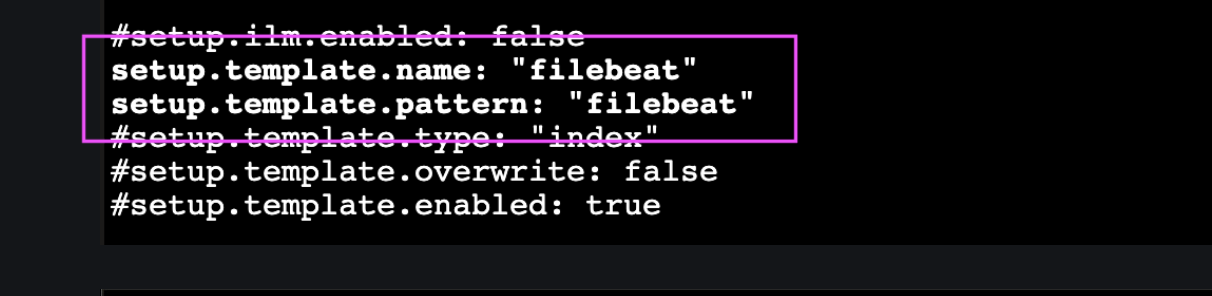
Ok I just saw your filebeat.yml...

This is NOT correct no reason to do that... comment those back out.

THIS is not correct either...

That will not work.. for several reasons
It does not match the template name
and is the index name you are constructing not the same name in your API key

I am not clear why you are changing any of these, especially if you are just learning,

My Suggestion is

  1. Clean Up in Elasticsearch, Clean up the Templates and any Data Streams / or Indices that have been created
  2. Go back to the default settings in the filebeat
  3. Do not change any of the defaults in filebeat except endpoint, protocols and creds. and the path to the files you want to read
  4. Follow the quickstart guide to get setup done
  5. Then create the API key as documented and substitute that in the filebeat.yml
  6. Then run

Get that all running and IF you want to change the name of the indices etc. (not recommended but sure you can do it)

Then we can go through the steps to do that is necessary.

Filebeat in 9.x will create data streams by default perhaps it would be a good idea to take a quick looks at the docs for them.

Get all the way backk to the defaults and report back when you get that running

1 Like

Thank you for the help @stephenb . I will follow your recommendation and report back the results. Appreciate you sir.

1 Like

Yeah we'll get you straightened out...

Then if you need some modifications we can work on that..

I would do the quick start and just change to the API key

That seems to have done the magic, commented out the fields you mentioned and the datastream and templates got created with data flowing now

1 Like