
Search in Enterprise Systems in 2025: to crawl or not to crawl
There are a lot of systems out there that are used by businesses: Github, Gitlab, Jira, Confluence, Sharepoint, Salesforce, Notion and many more. They have different data models, different permission models and often have much more differences than similarities.
Inevitably the data about processes, problems, and solutions gets scattered across all these systems. Imagine a project that’s being started in an organization: project briefs and other documents are written in Google Docs, work units are created in Jira, code and documentation go into Github, customer support cases get stored in Salesforce.
Now imagine that there’s an incoming support case about a feature and a support engineer needs to triage and troubleshoot the problem. They would need to search in each individual system - manually or via frontend. That can be a lot of work, and search experience and quality will differ highly between each system making finding answers a non-trivial task. Now imagine you have a whole organization that constantly needs to search for answers, documentation and discussions. This approach to search does not really scale.
We need to have a way to search over data in Enterprise Systems without making user log in and run a search query in every system.
Crawling the data
Traditionally Enterprise Search systems like Elastic Workplace Search worked with connectors that crawl content of Enterprise Systems like Sharepoint or Salesforce.
Let’s look at the flow taking Sharepoint Online as an example.
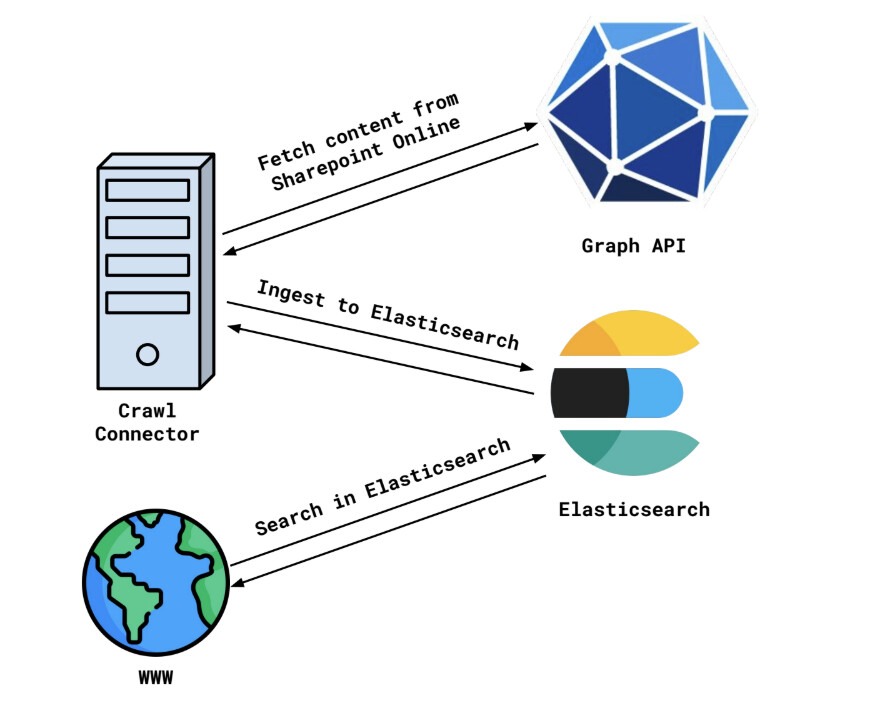
Sharepoint Online can be accessed via Graph API. There is a tree of entities that represent the data - Sites, Site Pages, Site Drives with Drive Items, Site Lists with List items. Every entity also has permissions attached to it - some sites (or other entities) are publicly visible, some are available only for logged in users, some are available only to specific users or groups.
A scheduled crawl would start, iterate over the content of the Sharepoint Online instance using Graph API and then store it in Elasticsearch, or any other database that gives good search capabilities. This is then repeated for each system that the user needs to search over and voila! The data is in Elasticsearch and can be easily searched over by your website! This is how our existing Elastic content connectors work.
Once the data from 3rd-party system gets to Elasticsearch we get solid benefits:
-
Search is more flexible and relevant. Elasticsearch has great built-in support for full-text search, vector search, semantic search, re-ranking - these provide great flexibility on search to give results that are more relevant to the user.
-
Search is cheaper and faster. Scaling systems like Jira or Sharepoint can be really costly compared to costs of scaling Elasticsearch by adding new instances or better hardware. Also Elasticsearch is optimised for search, so normally it takes less time to get results from it compared to time to get results from Graph API.
-
Elasticsearch is easy to scale if the load increases. By design Elasticsearch is a distributed database - it scales horizontally and vertically. It’s easy to add or remove new instances as needed without downtime.
This approach though is not perfect, it fundamentally has some issues that are difficult to solve, such as:
-
Syncs can take days to finish. If your organisation has terabytes of data in Google Drive, Sharepoint and other places it inevitably can take days to iterate through all the data and upload it to Elasticsearch. If throttling on third-party systems or Elasticsearch kicks in or remote systems are under heavy load with no budget to scale, it can take even more time.
-
Data gets stale quickly. Since the syncs can take days to finish the data will become stale by the end of sync. It is possible to stream changes or sync incrementally in some cases, but not every system supports incremental search.
-
Document-level security is difficult to implement. Permission models vary wildly between third-party systems and it is not always trivial to correctly extract permissions from 3rd-party APIs: there can be hidden groups, rule-based permissions that are evaluated at run time and a lot of tricky pieces that make it an almost impossible task to infer the permissions for entities. Additionally, it’s not always easy to associate users in Elasticsearch with users in 3rd-party systems, even if external identity providers like Okta are used.
Federated Search
In Workplace Search, however, there were 2 connectors that allowed for what we called “Remote Search” - real-time search on behalf of the user. These were the Slack and GMail connectors. The users would log in as themselves into Gmail using the OAuth 2 application they’ve set up. They get the token and then can issue requests to search APIs in Gmail on behalf of themselves.
Using the same example as before with Graph API, the very simplified interaction would look like this:
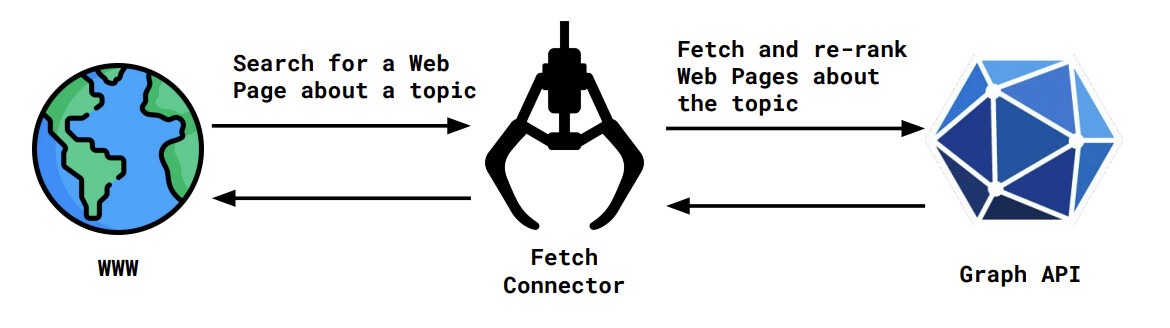
As mentioned, the interaction here is very simplified, but let’s go over the design conceptually.
By design federated search connectors have these strong benefits:
-
No need to fetch all data from 3rd-party systems to serve results of the search. This is a big plus if the amount of data in a 3rd-party system is huge and will take a lot of time to sync. Additionally, no storage is needed to store all this data.
-
Data is always fresh. The data is not crawled, but instead searched over as the user does the search. If a change happens in a 3rd-party, the search will return it immediately.
-
The user always sees only the data that they have access to. Since OAuth is involved, the users authenticate as themselves and authorise access to their data by the search application. They physically cannot access the data that they have no access permissions for. In case of crawl connectors, OAuth credentials on behalf of the user will be able to fetch only data available to the user. And if every user would set up a crawl connector on behalf of themselves, the amount of data stored in the database would be tremendous.
These benefits fundamentally cannot be achieved with the crawl approach at all. However this approach has downsides too:
-
Search and relevance quality heavily depend on 3rd-party source APIs. If 3rd-party API exposes an endpoint that searches for the exact match of the search term, it’s not really possible to do any sort of semantic search. Search results will be as relevant as 3rd-party API allows for it. If 3rd-party API does not support filtering, search results relevance will decrease significantly too.
-
Throttling and outages in 3rd-party systems means an outage for the search application as well. 3rd-party systems have request and throughput quotas. Once these quotas are exceeded, their APIs will start returning error messages suggesting for the application to take a pause and come back later. If the user needs data right now and 3rd-party system is down, then, well, it’s impossible to run the search until the system recovers.
This approach was used less often in Enterprise Search systems, but emergence of Model Context Protocol (MCP) made this approach significantly more popular. Now the user with Claude Code, Visual Studio Code or a similar application with an MCP Client can actually use the LLM to query 3rd-party systems, and LLM will help re-rank and summarise the results of the search of the user.
The approach really shines as the number of data sources grow and data is scattered across the systems - search applications with LLMs can query multiple systems, combine, re-rank the results and provide relevant and more accurate results on the fly without having to crawl the content of all of these systems that can take weeks.

It’s not a silver bullet, however. If the relevance of the results of MCP tool is low, or documents are big the LLM will not be able to provide a good answer. This, however, is a problem that can be addressed by making improvements to the tools used by the LLM.
-
If 3rd-party system cannot run semantic search LLM can help re-phrase the query. Imagine a user searching for a term “cat”, but the document they’re looking for actually contains the word “feline“. LLM can explode the term “cat” into a thesaurus cloud with words “kitten“, “feline”, “tabby” and such. This can help increase the chances that the expected document will be actually found without user having to manually re-phrase the query.
-
Overfetching and re-ranking results from 3rd-party sources can meaningfully improve the relevance. If 3rd-party application does not do relevance ranking the results that the user is looking for might not be returned in the first batch of documents returned by a search. This can be fixed by fetching more search results from 3rd-party system and re-ranking them on the fly. This can additionally help with big documents that can blow up the size of the context window for LLM - chunking the document and only returning relevant chunks will help the LLM provide accurate results while keeping the context window size manageable.
Theoretically both approaches can be employed in a modular manner - for each use-case the user can opt-in into using query re-phrasing, overfetching, chunking and re-ranking to improve relevance.
The search is changing
Several years ago we would not think of having a search experience that is available to the users directly on their machine. Large applications that serve search with web interface were a way to go, but with LLM emergence and MCP protocol the search is changing. A new search is a search that is facilitated by an AI agent and is more distributed, individual and relevant.
In the end federated search is great! It provides real-time experience, fresh data, permission enforcement out of the box, but the downsides are there and can be a deal-breaker.
In the end, the best search experience is going to lie in the combination of crawling your data and federated search.
Crawling is still a great approach for static content with simple permission models - think of shared Google drives, websites and wikis. When crawled and stored in Elasticsearch the data is always available and easy to search.
Federated search works wonders when data is too big, data needs to be fresh or permission models for data access are non-trivial and need to be strictly enforced.
In the end each use-case will need to find a good balance between crawling data into a database and federated search to get better relevance.
Elastic Agent Builder is providing a great platform that makes it easier to build a great search experience using the combination of the approaches - custom agents that have access to static content in Elasticsearch indices and federated search connectors in real time will provide a nice search via the chat interface with great relevance! With the MCP Server built into Kibana that can facilitate both federated search and search in Elasticsearch, Agent Builder can be the window to the modern search that you’re looking for!